


Email signatures are weirdly hard. You design one somewhere, paste it into your email, and it looks different the moment it lands. Most of us gave up and kept the one from three brokerages ago.
In ZachCRM, go to Templates, then Signature, then New, and pick a starting layout: Photo and logo, Minimal, Accent bar, Centered, Name band, or Blank. It fills in with the details from your profile, so it looks like yours from the first click.
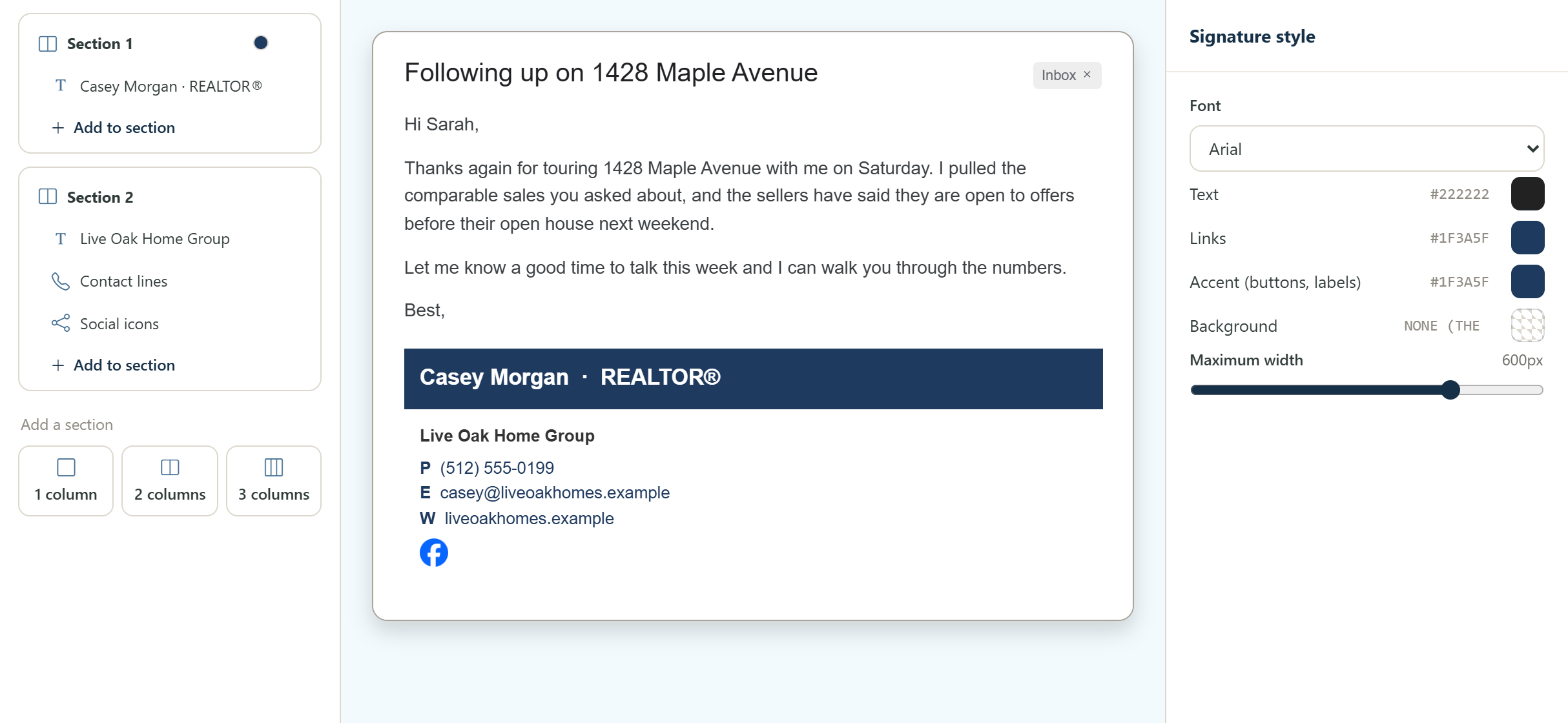
From there you build with sections and columns. Add text, images, contact lines, social icons, and links or buttons, and move them around until it feels right. The style panel sets the font, the text, link and accent colors, and how wide the signature can get. Images come from an upload, Google Drive or a link.
The middle of the screen is a real looking email, so you judge your signature where people will actually read it, under a message, not floating on a blank canvas.
Make one your default and it is added to new emails automatically, and any template can override it. If you also send from somewhere else, Copy signature and Copy HTML take it with you.